
Gold
XAUUSD Pip Value: What 1 Pip on Gold Is Worth
XAUUSD pip value explained: what one pip on gold is worth at 0.01, 0.10 and 1.00 lots, and why brokers disagree on what a gold pip even is.
9 min read
Read more →
How to add XAUUSD to MT5 through Market Watch, read its specification, and decode suffixes like XAUUSD.m so you pick the right gold symbol.
Open MetaTrader 5 for the first time and you may find no gold in the list at all. Knowing how to add XAUUSD to MT5 takes about a minute, but the symbol often hides behind a different name, such as XAUUSD.m or GOLD. Pick the wrong one and you may trade a different contract size than you planned.
This guide walks through the Market Watch steps, explains why the name changes from broker to broker, and shows the specification lines worth reading before your first trade. The examples use the site's shared setup: a $2,400 account, 0.10 lots, 1:500 leverage and gold at $4,300. Every spec value is illustrative, because yours comes from your own account.
XAU is the market code for one troy ounce of gold (31.1035 grams). USD is the currency it is priced in. So an XAUUSD quote of 4300.25 means one ounce of gold costs $4,300.25. The guide to what XAU/USD is covers the instrument itself.
On a forex platform you do not buy physical gold. You trade a CFD (contract for difference), an agreement to settle the price change in cash. That is why the symbol sits in the same list as currency pairs.
MetaTrader 5 is a trading platform that many brokers license. Each broker builds its own symbol list on a server, and MT5 only shows part of it at first. That is why a fresh install can look like it has no gold.
The panel you need is Market Watch, the list of symbols with live bid and ask prices. If you cannot see it, press Ctrl+M or open the View menu and choose Market Watch. Then follow these steps.
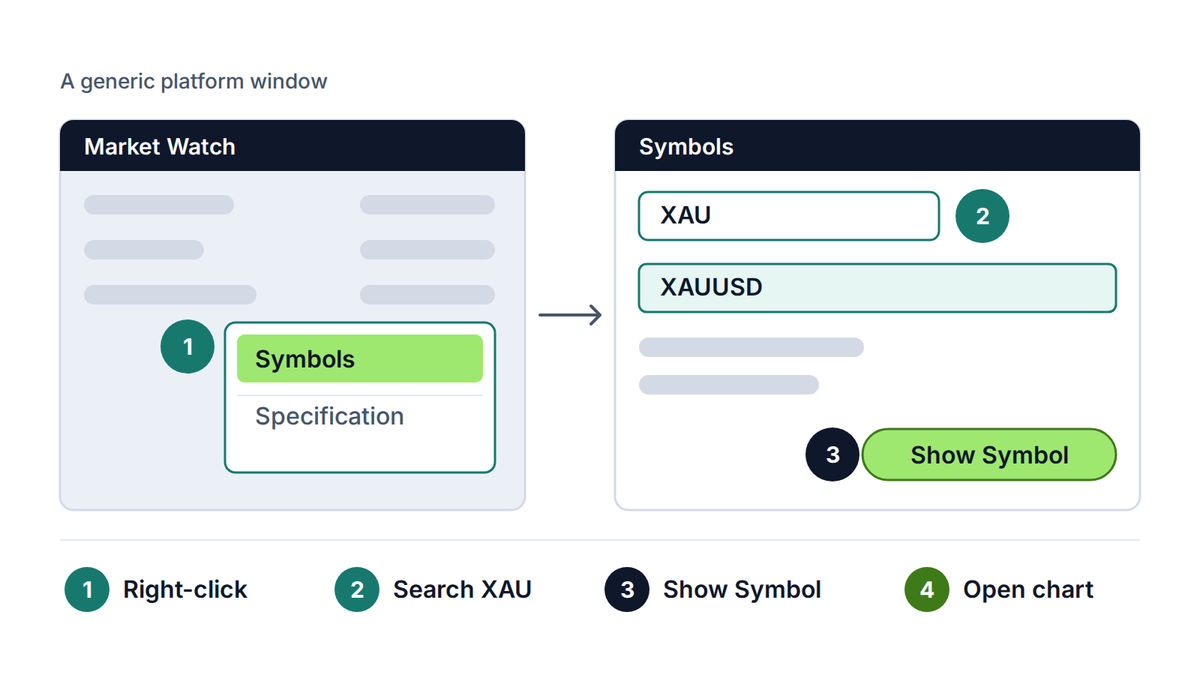
If the search returns nothing, try GOLD, then clear the box and browse the folders. Some servers hide the metals group until you expand it. If no gold symbol exists at all, your account type may not offer it, and your broker's support can confirm that.
Show only what you trade
Market Watch can get crowded. Right-click a symbol you do not need and choose Hide, so the list keeps only the instruments you actually follow.
There is no central register of MT5 symbol names. Each broker chooses its own, and the choice often tells you something about the account. A broker may add a suffix (extra characters after the name) to separate account types, or a prefix before it.
| Name you may see | What it often signals | What to check |
|---|---|---|
| XAUUSD | The plain name, common on standard accounts | Contract size and digits |
| XAUUSD.m or XAUUSDm | A mini or micro account, or a marker for one account type | Minimum lot and lot step |
| XAUUSD. or XAUUSD# | A raw-spread or ECN style account, or an internal marker | Commission per lot |
| XAUUSD.pro or XAUUSD.r | A professional or raw-pricing tier | Spread type and fees |
| GOLD or XAU/USD | A house name for the same instrument | Whether it is quoted in USD per ounce |
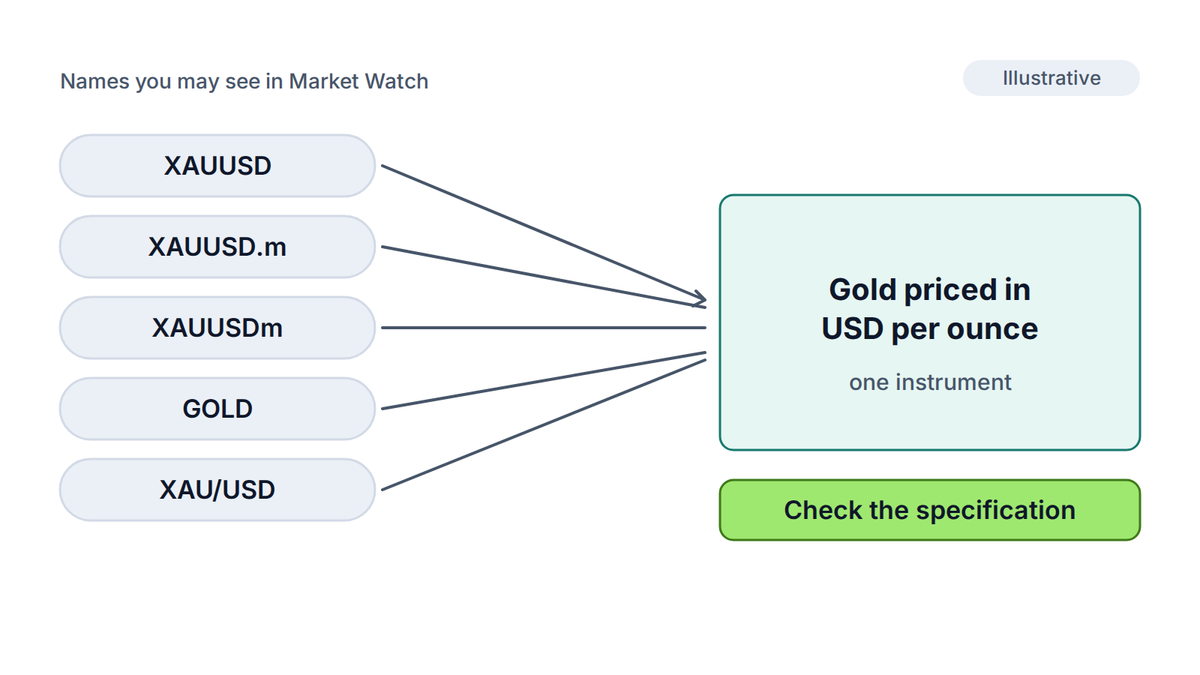
A suffix is a signal, not a guarantee. A symbol ending in .m might be a mini contract at one broker and simply a naming habit at another. The only reliable way to tell is to open the specification.
Two gold symbols on one server
Some servers list several gold symbols at once, for example a standard one and a mini one. They can have different contract sizes, spreads and minimum lots. Check which one your account is meant to use before you place a trade.
Right-click the symbol in Market Watch and choose Specification. MT5 shows the contract terms exactly as the server holds them, which makes this window more reliable than a brochure. The longer guide to gold contract specifications covers every line, and these are the ones to check first.
| Line in MT5 | What it tells you | Why it matters for gold |
|---|---|---|
| Digits | Decimals in the price, usually 2 for gold | Sets the smallest price step |
| Contract size | Ounces per 1.00 lot, often 100 | Sets money per price move |
| Tick size and tick value | Smallest step and what it is worth | Cross-check your own math |
| Volume min, max and step | Smallest and largest position, and the step between sizes | Limits how finely you can size a trade |
| Spread | Floating or fixed, in points | A cost paid on every trade |
| Swap long and short | Overnight charge or credit | Matters for positions held past rollover |
| Margin currency and rate | What the broker locks up | Decides how many positions you can hold |
| Trade sessions | Hours the symbol accepts orders | Shown in server time |
Look at Contract size first, since it feeds every dollar figure. With 100 ounces per lot and a two-digit price, a $1.00 move is worth $100 per lot. At 0.10 lots, that is $10 per $1.00 move, and a 30-point spread (0.30 in price) costs $3.00.
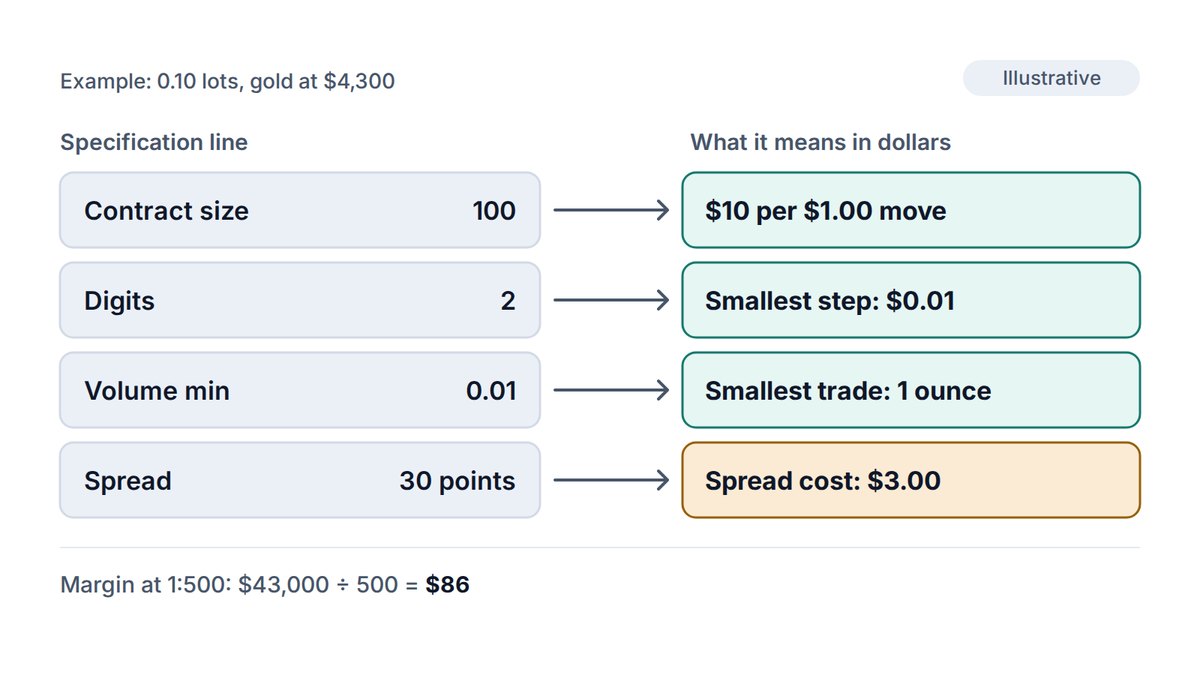
At $4,300, a 0.10 lot controls 10 ounces, a position worth $43,000. Leverage (the ratio between position value and the deposit that holds it) of 1:500 means a margin (the deposit locked up for the position) of $43,000 ÷ 500 = $86. That is about 3.6% of a $2,400 account. At 1:100, the same trade needs $430.
Try it now
Type your own contract size, price and leverage from the Specification window into the Margin Calculator to check the deposit a position locks up.
Adding the symbol does not mean you should trade it yet. Open a demo account (a practice account with virtual money) on the same server and place one small trade. The lesson on trading XAU/USD on a forex platform shows what to look for.
The guide to XAU/USD pip value turns a price move into money, and the one on lot size shows how to choose a position size that fits your risk. If you are still choosing where to trade, the lesson on account types explains what different accounts change.
A reminder on risk
Gold CFDs are leveraged. A small move in price can change your balance quickly, so size a trade to the loss you can accept, not to the margin your account allows.
The symbol may exist on your server under another name, such as GOLD or XAUUSD.m. Open the Symbols window, search for XAU and then for GOLD, and expand the folders. If nothing appears, your account type may not include gold, so ask your broker's support.
It is a suffix the broker added, often to mark a mini or micro account, but meanings vary. Open the Specification window to see the real contract size, minimum volume and spread instead of guessing from the letters.
Yes, in practice. XAU/USD is the written pair and XAUUSD is how MT5 usually shows it, without the slash. Both mean one troy ounce of gold priced in US dollars.
Only the symbols your server lists for your account are tradable. If it shows two gold symbols, they may differ in contract size or costs, so compare their specifications and use the one your broker assigns to your account type.
The PipsMorrow Team
A team of writers covering XAU/USD gold trading education. We focus on explaining the mechanics and risk management in a structured way, with no trade signals and no promotion of any specific broker.
Last updated
XAUUSD pip value explained: what one pip on gold is worth at 0.01, 0.10 and 1.00 lots, and why brokers disagree on what a gold pip even is.
9 min read
Read more →Gold market open time in New York time and UTC: when XAU/USD opens on Sunday, the daily break, the weekly close and the busiest hours of the week.
10 min read
Read more →Pips in forex explained: what a pip is, how to count them on any pair including yen pairs, and how to work out what one pip is worth in dollars.
7 min read
Read more →Build on this article with the full gold trading curriculum, ordered from the basics to advanced topics, free.

