
Tools
Forex Expert Advisor: What an EA Can and Cannot Do
A forex expert advisor is a program that trades your written rules on MT5. See what it automates, what it cannot judge, and where automated strategies fail.
11 min read
Read more →
MT4 vs MT5 for gold: compare timeframes, order types, hedging and netting, testing, and see why an expert advisor built for one will not run on the other.
The mt4 vs mt5 question comes up for every new trader, because most brokers offer both platforms and they look almost the same. For trading gold by hand, the gap is smaller than the marketing suggests. For automation, it is a wall: an expert advisor built for one will not run on the other.
This article covers what actually differs, what it means for XAUUSD (gold quoted against the US dollar), and how to pick a platform without chasing feature lists. It makes no claim that one is better for profit, because neither platform creates an edge.
MetaTrader 4 launched in 2005 and MetaTrader 5 followed in 2010. Both are terminals (the program on your computer or phone that shows charts and sends orders to your broker). MT5 was built from scratch, not as a version upgrade, so the two do not share files, accounts or code.
That has a practical result. When a broker gives you a login, it is for one platform. A MetaTrader 4 login does not work in the MT5 terminal, so moving platforms means opening a new account at the broker. Your balance, history and settings do not travel with you.
Many brokers offer both, but not all do, and a few offer only one. Before you choose, check which your broker supports and whether the gold symbol is listed on that platform. The guide to how to add XAUUSD to MT5 shows what to look for.
The first differences you notice are in the toolbox. According to the MetaQuotes comparison table, checked on 18 Nov 2026, the counts look like this.
| Feature | MT4 | MT5 |
|---|---|---|
| Timeframes | 9 | 21 |
| Built-in indicators | 30 | 38 |
| Pending order types | 4 | 6 |
| Strategy Tester | Single thread | Multi-threaded, multi-currency, real ticks |
| Markets the platform supports | Forex only | Forex, futures, options, stocks, bonds |
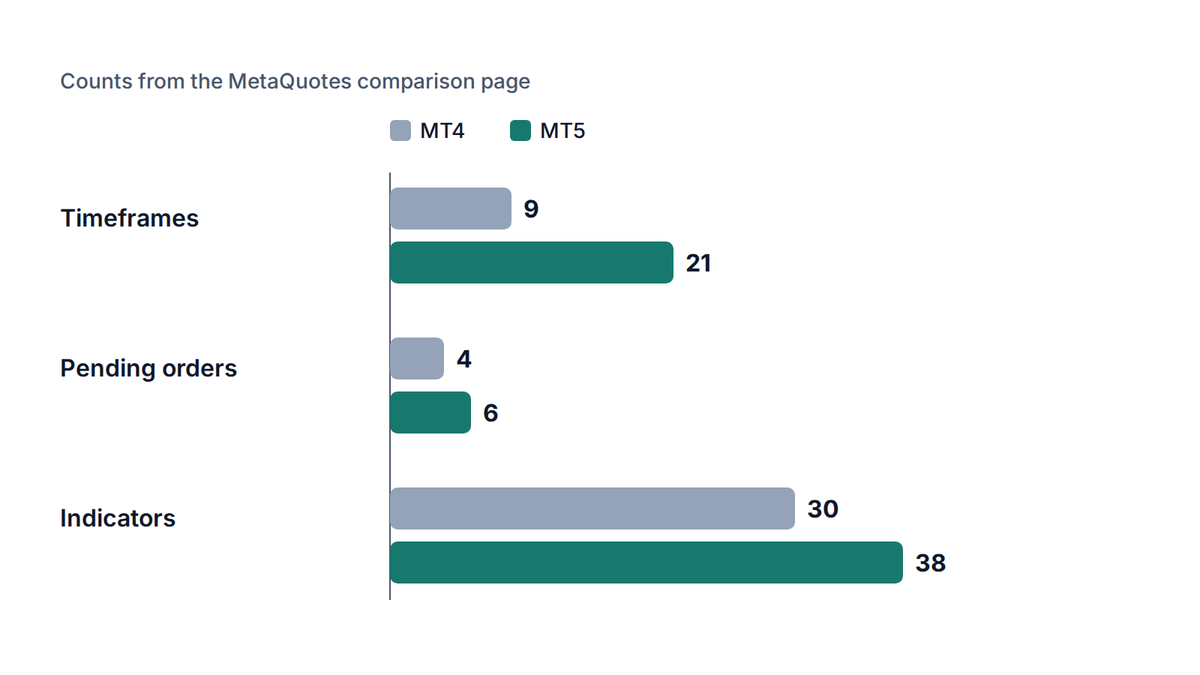
The extra timeframes include 2-minute and 8-hour charts, which some traders like for lining up entries. The extra indicators and tools are mostly variations of ones you already know. If your gold method uses a moving average, RSI and a support line, both platforms have all three.
MT5 also adds an economic calendar and a depth of market window (a ladder of waiting buy and sell orders). The calendar is handy for gold, which moves on US data. The depth of market is built for exchange-traded products, and on a forex or gold CFD (a contract for difference, which tracks the price without owning the metal) it often shows little or nothing.
Both platforms offer market orders plus four pending types: buy limit, buy stop, sell limit and sell stop. If those still blur together, buy limit vs buy stop explains them with gold prices.
MT5 adds two more: buy stop limit and sell stop limit. A buy stop limit has two prices. The stop price is a trigger above the market. When touched, the platform places a buy limit at a second, lower price you also set. It suits a trader who wants a breakout but refuses to chase it.
MT5 also lets you choose a fill policy, such as fill or kill (the whole order fills at once or not at all) and immediate or cancel (fill what is available, drop the rest). Which of these your account allows depends on the broker. Gold can move fast around news, so it is worth reading the symbol specification before assuming you have the choice.
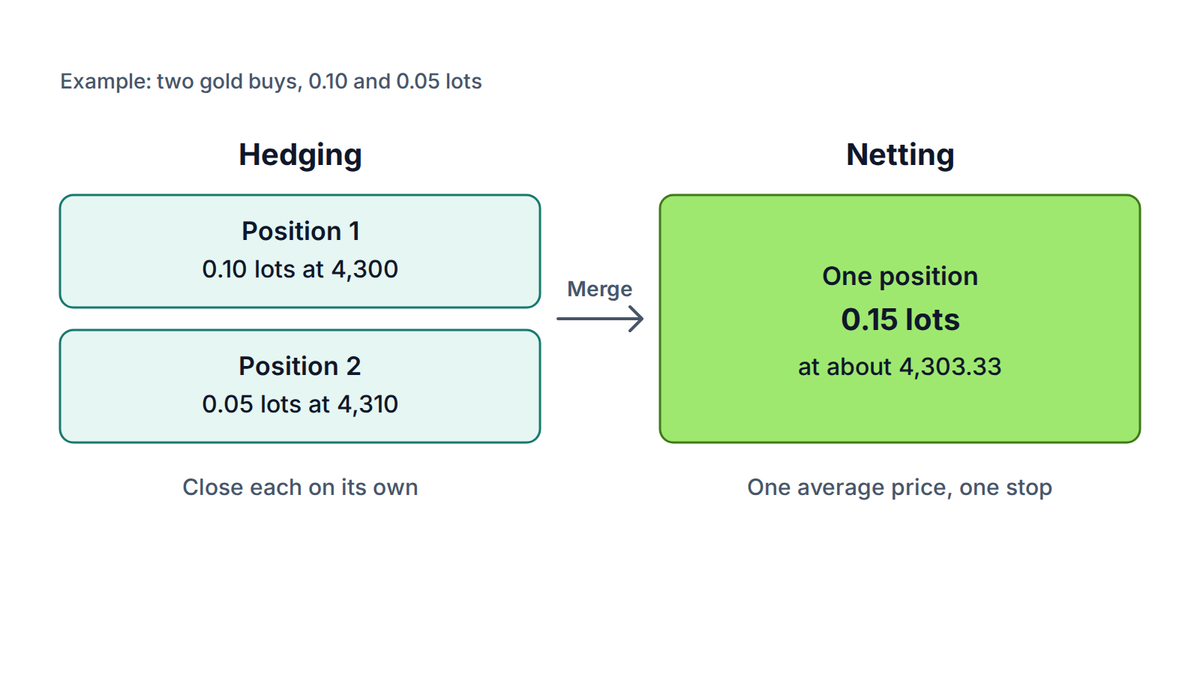
This is the difference that surprises people most. On a hedging account, every trade is its own position. On a netting account, all trades on one symbol merge into a single position with one average price.
MT4 accounts are always hedging. MT5 accounts can be either, and the broker picks the mode. Read your account details or the lesson on account types and what they change before you assume one or the other.
Here is the gold example. You buy 0.10 lots at 4,300 and later buy 0.05 lots at 4,310. On hedging you hold two positions that you can close separately, with separate stops. On netting you hold one position of 0.15 lots at an average price of about 4,303.33.
The size matters too. At 100 ounces per lot, a $1.00 move on 0.15 lots is $15. The margin (the deposit your broker holds against the position) at 1:500 on 0.10 lots with gold at $4,300 is $86, and you can check other sizes with the margin calculator.
Why this matters for stops
On a netting account, a new trade in the same direction changes the average price and can move where your stop sits relative to your entry. Check the stop and target after every add, not just once.
An expert advisor is a program that lives inside the platform and trades by rules. If you are new to the idea, forex expert advisor explains what one does and where it fails. The cross-platform problem has three layers.
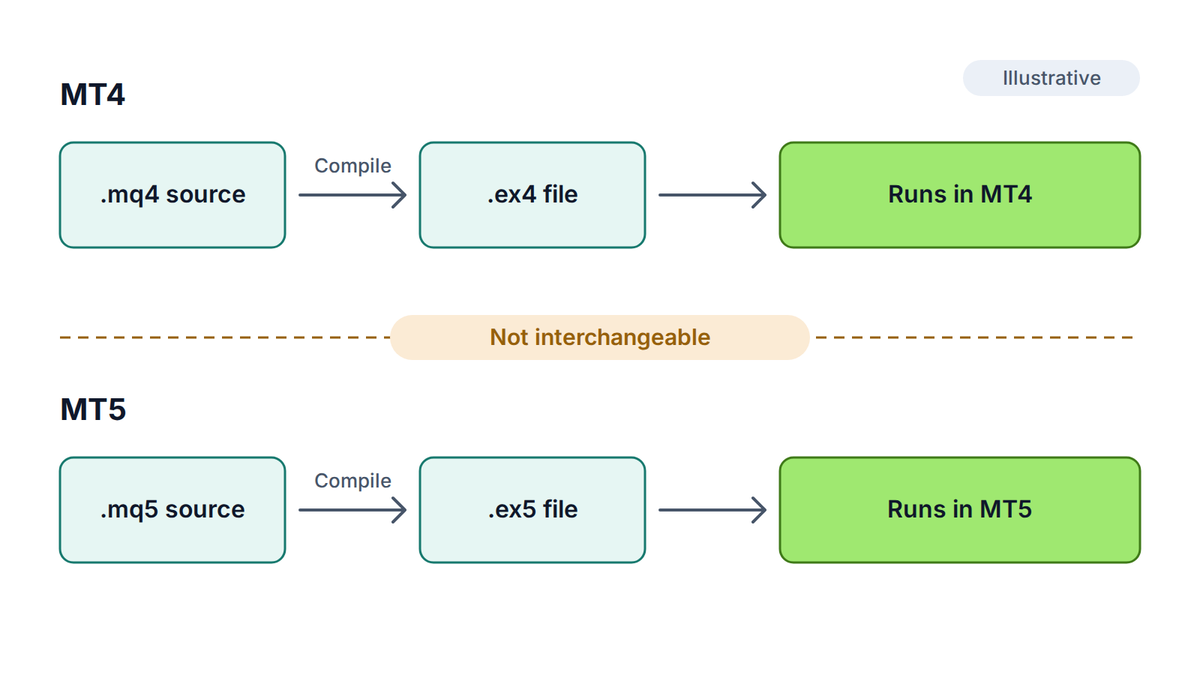
Even a tidy translation is not the end. Position handling differs, especially on a netting account, so an EA that opened a second hedge in MT4 would instead enlarge the first position in MT5. The logic, not just the syntax, has to be checked, and the translated EA needs a fresh test.
For you, the rule is simple. Before you buy, download or build an EA, confirm which platform it is for. The EA Builder on this site produces MT5 files (.mq5) only, so it needs an MT5 account to test. It is an educational tool, and nothing it produces is a recommendation to trade.
The MT5 Strategy Tester can run on several processor cores, test across several symbols at once and replay real ticks (the actual recorded price changes) where your broker supplies them. The MT4 tester uses a single thread and works from built-in history.
Better tools do not make a test honest. On gold, a result that ignores widening spreads around news or the rollover hour looks better than a live account would. The article on backtesting trading strategies covers how to test without fooling yourself.
Also remember that a backtest on one platform does not carry over to the other. An EA in MQL4 and its MQL5 translation may behave differently, so the translated version has to be tested from scratch.
On the question of mt4 vs mt5 and which is better, the honest answer is that it depends on how you trade. Neither one changes the price of gold or your odds. Use the points below to decide.
Whichever you choose, do not start with a live account. Open a demo account on the platform, add the gold symbol, place a few trades and read the contract specification. Forex demo account explains what demo shows and what it hides.
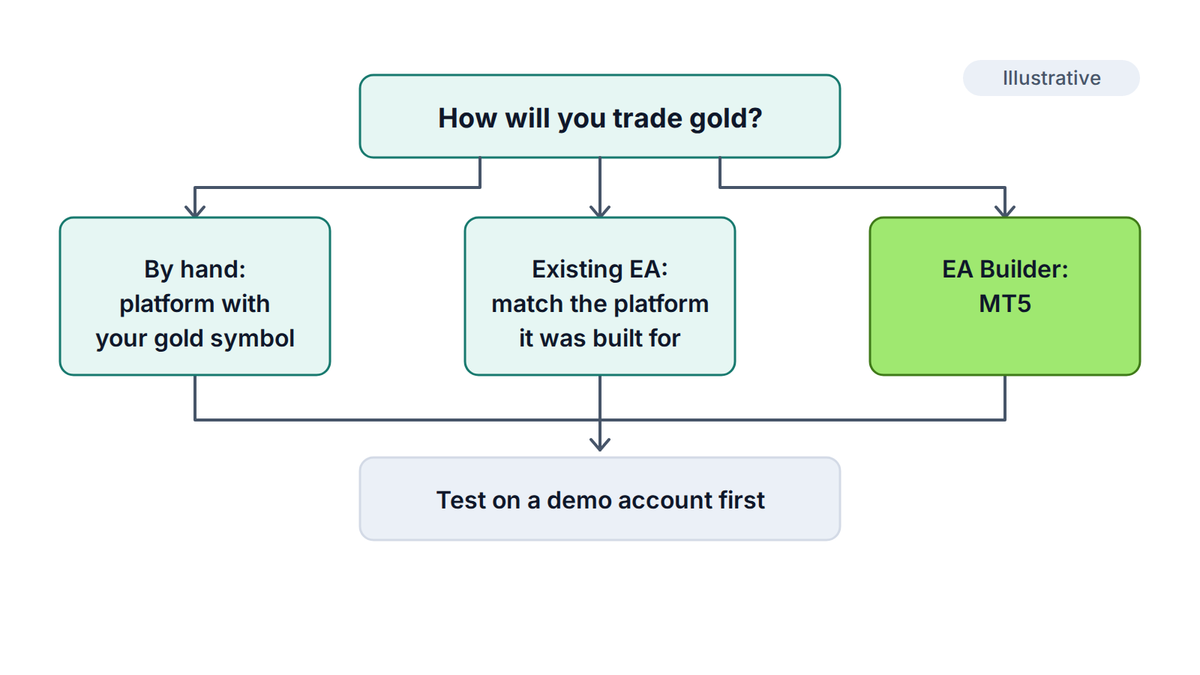
Neither is better for results. MT5 has more timeframes, order types and testing tools. MT4 is simpler and still widely supported. For hand trading gold the gap is small, and for automation the deciding factor is which platform your EA was written for.
No. An MT4 EA is a .ex4 file written in MQL4, and MT5 only loads .ex5 files written in MQL5. The code has to be rewritten and then retested. Position handling differs, so a line-by-line translation is not safe.
No. MT5 supports forex and metals like gold as well as other markets. What you can trade depends on the broker. Most brokers that offer MT5 list their forex and gold symbols there.
No. A login is tied to one platform at one broker. If your broker offers both, you usually open a separate account for each, and balances and history do not move between them.
MT5 has the more capable tester, with multi-threaded runs, multi-symbol tests and real ticks. A better tester does not make a strategy profitable. The quality of your data and the costs you include matter more.
The PipsMorrow Team
A team of writers covering XAU/USD gold trading education. We focus on explaining the mechanics and risk management in a structured way, with no trade signals and no promotion of any specific broker.
Last updated
A forex expert advisor is a program that trades your written rules on MT5. See what it automates, what it cannot judge, and where automated strategies fail.
11 min read
Read more →Buy limit vs buy stop: one waits for a lower price, the other for a breakout. See how each pending order works, with forex and gold examples and sell versions.
10 min read
Read more →How to add XAUUSD to MT5 through Market Watch, read its specification, and decode suffixes like XAUUSD.m so you pick the right gold symbol.
7 min read
Read more →Build on this article with the full gold trading curriculum, ordered from the basics to advanced topics, free.

